
The Yoto API now includes scopes.
This took a lot of internal work, but we think it brings much more clarity for both developers and users.
What are API scopes?
Scopes control how much of your Yoto data an external app can access from a specific service.
If you’ve ever granted a third-party app access to your Google Calendar or Gmail inbox, you’ve used scopes before.
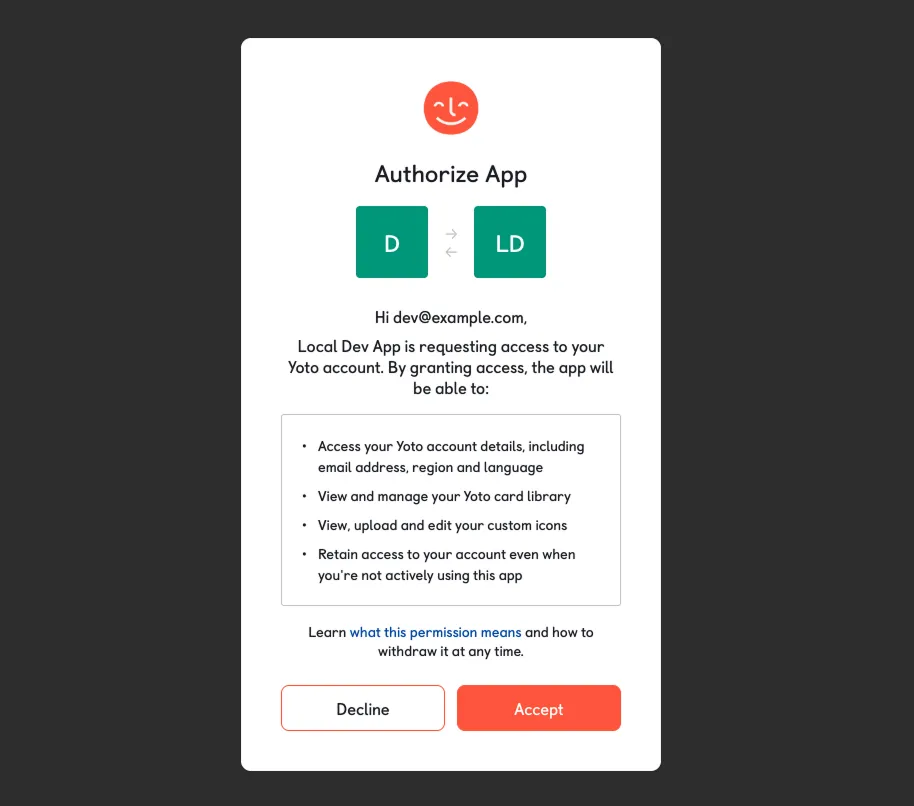
For users, this means you don’t have to trust that a developer will only use the data they need, and you can check this for yourself before logging in with Yoto.
For developers, this reduces your room for error. You declare what your app needs upfront, and you know that’s all you’ll ever get access to.
For example, take the third-party Yoto battery monitor app. It needs access to your Yoto devices to check battery levels and send you an email about them. But it doesn’t need access to your playlists — and it would be suspicious if it asked for that.
Until now there was only a single level of access for the entire Yoto API. Scopes fix this.
What’s changing?
For developers:
When you create a new application from the developer dashboard, on top of selecting the type of client (public or confidential), you’ll see a list of available scopes. You select which ones your app needs, and those are the only parts of the API your app can reach.
For details about the data that each scope grants you access to, you can refer to the dedicated page in our documentation.
For users:
When you authorise an app by logging in with Yoto, you’ll see a clear list of all the data from your account that the app is requesting. This gives you the information to decide whether that access is justified based on what the app does.
Existing apps
Existing apps are not affected immediately, but we’re asking all developers to migrate to scopes by the end of June 2026. If you have an app in production, head to the developer dashboard and select the scopes your app needs.