
Overview
The chapters in Yoto cards are divided into tracks, which are generally static audio files. This is the case for the vast majority of our cards. But you can also set a track to be a URL.
This lets you create cards that are entirely dynamic, that will produce different results every time the card is inserted into the player. We saw this used with a lot of success during our developer competition last summer.
The first card of this kind to ever appear on our Yoto app was a card named Where’s That Satellite. I made it for our Play Date event to showcase the capabilities of dynamic cards, so here is how it works.
Data Source(s)
There’s a lot of data about the world all over the internet, in various formats, and it’s a fun challenge to turn that data into an interactive piece of audio that children can enjoy through Yoto.
This has been used a lot again during our competition with cards like Dreaming of a Jet Plane, Bird Song Explorer and others. This is why this was the first thing I wanted to make as a demo when we launched the developer platform.
If you’ve ever worked on any kind of data visualization workflow, the process is going to be familiar. It generally goes something like this:
- Get data: Find a dataset
- Interpret data: Turn it into a format that makes the most sense for your output
- Display data: Output/visualise the data
So let’s start with getting the data.
Finding our dataset
Space and dinosaurs are usually a safe bet when it comes to children’s content, and I knew that NASA had a bunch of free, public APIs.
The one I’m using here is their TLE API, which lets us derive the position of specific satellites.
TLE stands for Two-Line Element set. It’s an old standardised format that describes the orbit of a satellite with literally two lines of plain text with space-separated numbers.
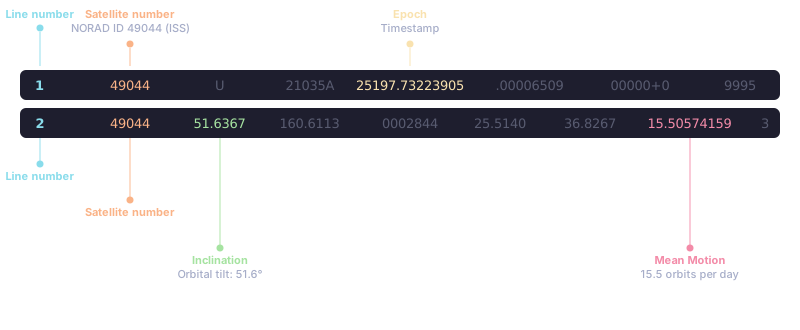
The API lets you look up any satellite by its NORAD catalog number. The satellite we’re tracking is the International Space Station, which is 49044. If you query the endpoint with that number and you get back the two TLE lines for the ISS:
const response = await fetch('https://tle.ivanstanojevic.me/api/tle/49044');
const tle = await response.json();
const tleLine1 = tle.line1;
const tleLine2 = tle.line2;
That’s our raw data, now we can turn it into a format that fits our needs.
Interpreting our dataset
So we have the TLE data, now we want to know where the satellite is compared to us. We want a location on earth, i.e., a latitude and a longitude.
If you look up an online satellite tracker, that’s exactly what they do: take space data, calculate the current lat/lng, and overlay it on a map.
There’s a library called satellite.js that does all conversion for us. You feed it the two TLE lines and a timestamp, and after a few conversions, gives you back the position in geographic coordinates:
const satrec = satellite.twoline2satrec(tleLine1, tleLine2);
const now = new Date();
const positionAndVelocity = satellite.propagate(satrec, now);

const gmst = satellite.gstime(now);
const positionGd = satellite.eciToGeodetic(positionAndVelocity.position, gmst);

const latitude = satellite.degreesLat(positionGd.latitude);
const longitude = satellite.degreesLong(positionGd.longitude);
We have a lat/lng pair but we can’t overlay it on the map, this is an audio product. So the next question is: How do I turn these coordinates into something a kid can picture? We need to translate them into something recognisable, like a country.
From this point in latitude and longitude, we have to figure out: which country is this point in?
The next question is, how are country boundaries represented in relation to latitude and longitude?
What we want is a list of countries represented as polygons, with each point as latitude and longitude. That’s really easy to find because that’s exactly what is used everywhere by government agencies, mapping apps, taxi apps, etc.
There are a few formats but the easiest to work with in JavaScript is called GeoJSON. And there’s an even handy package: @geo-maps/countries-maritime-250m
Once we have a GeoJSON with every country as a polygon, we do a point-in-polygon lookup to find out which country contains this point.
import GeoJsonPolygonLookup from 'geojson-geometries-lookup';
import getWorldMap from '@geo-maps/countries-maritime-250m';

const worldLookup = new GeoJsonPolygonLookup(getWorldMap());

const countries = worldLookup.getContainers({
  type: 'Point',
  coordinates: [longitude, latitude],
});
Now we can say “the ISS is currently flying over [country name]”.
Oh no, oceans
But there’s a catch. With the earth being mostly water, most of the time the satellite isn’t over a country at all, it’s over an ocean.
If let’s say even 30% of the time when you inserted the card it just said “over water” then it would be a little bit boring.
Remember how, in the previous section, we said it was easy to find a list of countries as polygons? Then you would assume it would be equally as easy to find a list of oceans and seas as polygons.
Well, it turns out this wasn’t the case at all. This might have changed in the last 6 months, but when I searched last time I just could not find a list of oceans and seas as polygons in GeoJSON format. Oceans alone were available, but if you wanted seas as well, it just wasn’t.
The only dataset I found was from the Flanders Marine Institute in Belgium. It was a really big dataset, and definitely not suitable for real-time use. So I simplified the polygons a lot, converted the data into geojson and then turned it into a package oceans-seas.geojson.
import GeoJsonPolygonLookup from 'geojson-geometries-lookup';
import getWorldMap from '@geo-maps/countries-maritime-250m';

const oceansLookup = new GeoJsonPolygonLookup(oceansMap);

const oceans = oceansLookup.getContainers({
  type: 'Point',
  coordinates: [lng, lat],
});

if (oceans.features.length > 0) {
  return oceans.features;
}
return 'the ocean';
Now we can follow the progress of the satellite live, and know where it is right now in a way that’s easy to understand and visualise. You can even follow it below!
Turning dynamic data into audio
Now that we have the location in the way that we want it, we need to create a URL that we can assign to a track in a Yoto card, which will be requested every time the card is inserted.
Luckily, and thanks to our partnership with ElevenLabs, that was the easy part.
We created a serverless function and put the function’s URL in the card. The function does 3 things:
- Query the NASA API to get the live TLE data for the satellite
- Convert that space data
- Use ElevenLabs to turn that dynamic, real-time text into an audio narration.
export const handler: Handler = async () => {
  const { location } = await getSatelliteData('49044');

  const text = `All the way up in space, the International Space Station is going around the earth.
  And right now, it's flying over: ${location}!`;

  const res = await fetch(
    `https://api.elevenlabs.io/v1/text-to-speech/fNYuJl2dBlX9V7NxmjnV?output_format=mp3_22050_32`,
    {
      method: 'POST',
      headers: {
        'Content-Type': 'application/json',
        'xi-api-key': process.env.ELEVENLABS_API_KEY!,
      },
      body: JSON.stringify({
        text,
        model_id: 'eleven_turbo_v2_5',
      }),
    }
  );

  const buffer = Buffer.from(await res.arrayBuffer());

  return {
    statusCode: 200,
    headers: { 'Content-Type': 'audio/mpeg' },
    body: buffer.toString('base64'),
    isBase64Encoded: true,
  };
};
And that’s it, now you know all that goes into making an interactive Yoto card.
I hope this inspires you to build your own, and if you do, please share it with us!